Bill Atkinson, Andy Hertzfeld, Eazel, Nautilus and GNOME 1.4

I’m a big fan of Bill Atkinson’s work on the original Macintosh, in particular QuickDraw and MacPaint. Today I heard the news that he has pancreatic cancer:

On October first, I was diagnosed with pancreatic cancer. Because of vascular involvement, surgery is not possible. I am taking weekly chemo treatments to shrink the tumor before surgical resection. I am tolerating the chemo pretty well, and I am in good spirits. Every day I make a point of getting out in the sun and walking with Cai and Poppy.

I wish him well with his fight with cancer.

A related post from Dr. Drang on Mastodon led me to re-read a great story on folklore.org about Bill, written by Andy Hertzfeld:

Bill Atkinson, the author of Quickdraw and the main user interface designer, who was by far the most important Lisa implementer, thought that lines of code was a silly measure of software productivity. He thought his goal was to write as small and fast a program as possible, and that the lines of code metric only encouraged writing sloppy, bloated, broken code.

This lead to a Wikipedia rabbit hole that started with Andy and Bill co-founding General Magic along with Marc Porat, and concluded with me discovering that the Nautilus file manager used in GNOME was created by Eazel, a company Andy Hertzfeld founded after General Magic. Eazel didn’t succeed, but as it laid off most of its 75 employees, 1.0 of Nautilus was released. This 1.0 version was included in GNOME 1.4, released on 13 March, 2001.

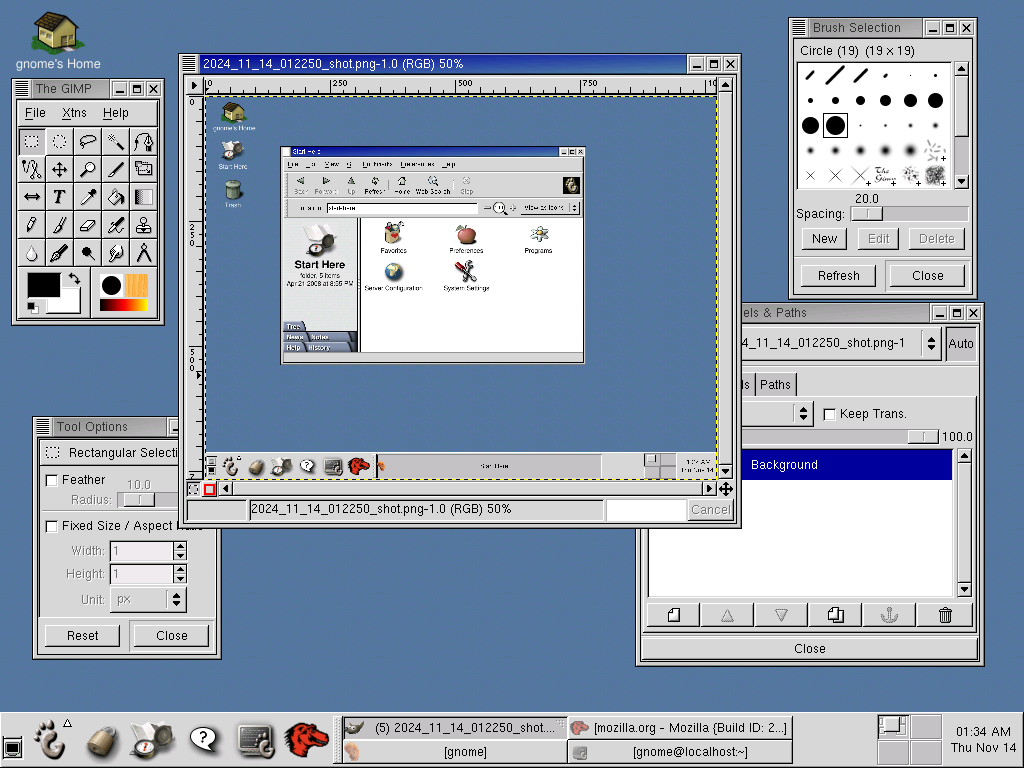
I was able to track down a virtual machine image of Red Hat running GNOME 1.4 and after a little but of massaging was able to run it in QEMU on my much newer Linux system. Incidently GNOME Files—Nautilus’ successor—is my file manager of choice on Linux. Please enjoy these screenshots I took of that surprisingly usable 23 year old system.

Screenshot of the GNOME 1.4 desktop. There is a Nautilus window open on the 'Start Here' page.
Start Here
Screenshot of the About Nautilus dialog listing many names in the credits, including Andy Hertzfeld. The Eazel logo is in the top right of the window.
About Nautilus
A screenshot of early 2000s GIMP.
GNU Image Manipulation Program
An early version of the GNOME website in the Mozilla browser.
Early version of the GNOME website in the Mozilla browser
The now defunct Linux Orbit website in the Mozilla browser
Linux Orbit website in the Mozilla browser
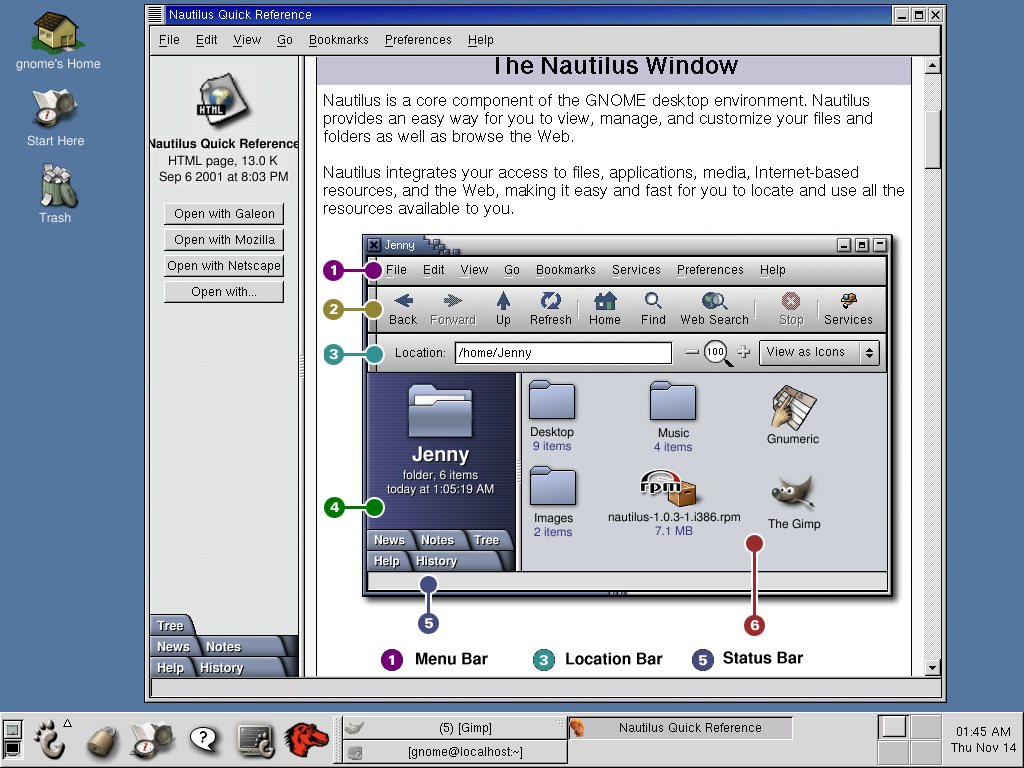
Screenshot of the Nautilus help showing a delightfully annotated screenshot of a Nautilus window.
Nautilus Help

If you’d like to try it out yourself, follow the steps below to run it with QEMU. Alternatively, if you use Virtual Box you can import the .ova directly:

  1. Download the image from http://ftp.gnome.org/pub/GNOME/misc/GNOME1.4.ova
  2. Extract the disk image: tar xf GNOME1.4.ova
  3. Convert it to qcow2: qemu-img convert GNOME\ 1.4-disk1.vmdk GNOME\ 1.4-disk1.qcow2
  4. Run it: qemu-system-i386 -m 256M -nic user,model=pcnet -drive file='GNOME 1.4-disk1.qcow2'

The login details are: username gnome, password gnomehistory. The root user also has the same password.

Write JavaScript like it’s 2005Permalink

Mu-An Chiou:

“Write JavaScript like it’s 2005” had been GitHub’s front-end team’s guideline since its inception, until React got pushed down from Microsoft management and most of us on the front-end team quit. If you are a user of github.com, consider how it has changed since 2020.

This is an old practice that has gotten lost in the ways with the manufacture of JavaScript industrial complex/ecosystems and frameworks. I hate to be the one to tell old tales but this is just another reminder that you can absolutely avoid dependency hell, We used to review every single dependency that goes into GitHub Dotcom and during our time the JS bytes continuously decreased as features were added.

That guideline was certainly evident as a user, as was the change post 2020. In some ways, the post-2020 pages have more features and respond to interactions faster but at the same time the new React based source view is infuriating at times: trying to select text and having it highlight the whole symbol for the symbol view/search, or Ctrl-f not always invoking the browser UI, for example.

Challenges Using systemd on Embedded SystemsPermalink

Kevin Boone:

I’ve found that many systemd components are less effective in an embedded environment than the traditional alternatives. I’ve shown some illustrative examples in this article, but I really don’t think there’s much controversy here: this simply isn’t the environment that systemd was designed for. But it’s getting increasingly difficult to find a mainstream Linux distribution that doesn’t use systemd – even Raspberry Pi distributions use it.

As systemd absorbs more functionality into itself, there’s going to be little motivation to maintain alternatives. After all, if everybody uses systemd, what motivation is there to support anything else? My concern is that we’re moving towards a future where Linux is inconceivable without systemd. That will be a problem for those environments where systemd really doesn’t shine.

Dinit feels like it could be a good option:

Dinit fits in the middle ground between extremely simple supervision suites and the more complex service managers.

It’s the init system used on Chimera Linux, which I’m running on a number of systems, including the WSL2 install that I’m writing this post on. Dinit has been great in my experience, although that’s admittedly also on desktop and server machines. It’s a lot smaller in scope than systemd so it would allow embedded systems to continue to use tools like Chrony and syslog-lite mentioned in the post.

QuickTime as a Tape Archival FormatPermalink

Chris Hanson:

A lot of people think QuickTime is a “video format,” but that’s not really accurate. Video and audio playback are applications atop the QuickTime container format; the container format itself is a means of representing multiple typed tracks of time-based media, each of which may have their own representation in the form of samples interpreted according to their own CODECs.

All of these are represented within a file as atoms which represent well-identified bags of data with arbitrary size and content, making it very easy to write general-purpose tooling and also to extend over time. (The last major extension to the low-level design was in the 1990s, to support 64-bit atom sizes, so it’s quite a stable format already.)

QuickTime, like TrueType before it has proven to be quite a well-designed format. If you’re looking for inspiration for a binary data format these feel like great candidates.